The AI Automations That Actually Earn Their Keep in a Small Business
You’ve heard you should automate everything. Most of that advice comes from people who don’t have to maintain whatever they’re telling you to build.
The honest list is shorter than the LinkedIn list. There are maybe five or six AI automations that genuinely pay back the setup time for a typical small business, and most owners don’t have any of them running yet. The rest of what the internet wants you to set up is either rebranded software you already had, or AI for the sake of AI, which is the most expensive kind.
Here’s the working list. The automations I’d actually set up for a service business in 2026, what each one does, where each one fails, and which one to start with if you’re only going to do one.
What an automation has to do to earn its place
Before any specific tool, the same test from every other AI decision applies. An automation is worth building if all three of these are true:
- It replaces real, repetitive work someone is doing today.
- A pretty-good answer in five seconds beats a perfect answer in an hour.
- The cost of being wrong is small, or a human glances at the output before it goes out.
If a proposed automation fails any of those, it’s a science experiment, not a tool. Skip it. The ones below all pass.
The automations actually worth setting up
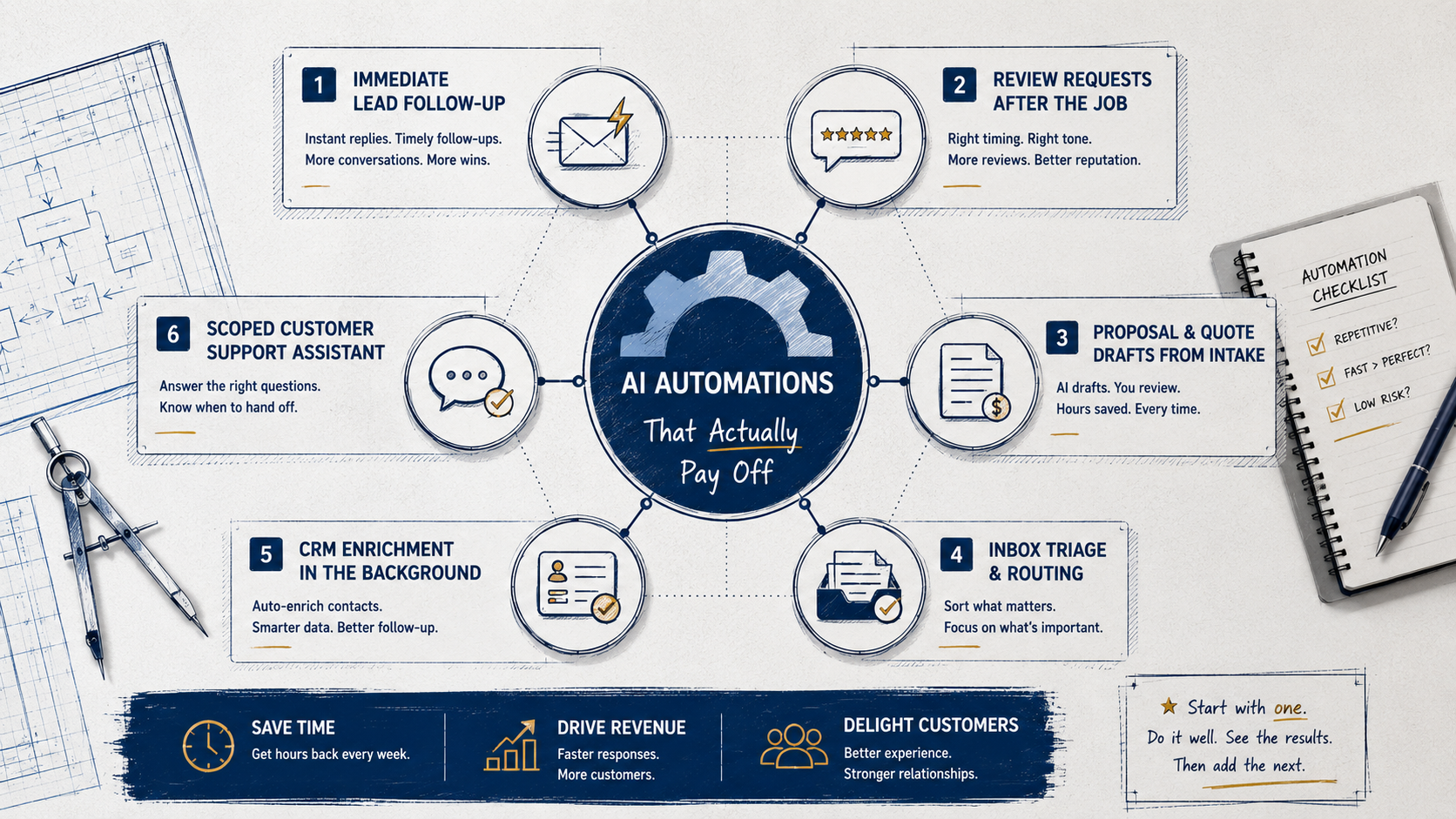
1. Immediate lead follow-up
When a new lead comes in (form fill, missed call, web chat), a human is almost never the fastest replier. An automation can be. A real acknowledgment within seconds, a useful follow-up the next day if there’s no response, one more nudge a few days after that. Three touches, not thirty.
This is the single highest-ROI automation for almost every service business I’ve looked at. Speed-to-lead is one of the most-studied numbers in sales for a reason. The first vendor to respond wins disproportionately, and “first” usually means minutes, not hours.
2. Review requests after the job is done
A short, polite ask sent at the right moment (job complete, invoice paid, project signed off) gets you a step-change more reviews than waiting and hoping. Done well it doesn’t read as automated. It reads as “hey, thanks for the work, here’s the link if you’ve got 60 seconds.”
Done badly it reads as spam. Don’t send three. Don’t ask twice. Don’t pretend a bot wrote it by hand. The trick here is timing and tone, not technology.
3. Proposal and quote drafts from a short intake
For consultancies, contractors, and any business that sends customized proposals, this is the second-highest payoff after lead follow-up. A short intake form or call summary feeds an AI that drafts the proposal using your real templates and pricing. The owner edits and sends. What took 90 minutes takes 15.
The trap: never let the AI invent prices or scope. The structure and language are the AI’s job. The numbers and commitments are yours.
4. Inbox triage and routing
Email is most small businesses’ worst piece of infrastructure. An AI that reads incoming messages, separates real leads from sales pitches and existing-customer issues, and surfaces what’s urgent gives you hours back per week. Done right it’s invisible. You just stop drowning.
5. CRM enrichment in the background
Every contact in your CRM should have a company name, a role, an industry, and some basic context. Almost none of them do, because nobody has time to fill that in. An AI that quietly enriches new contacts as they arrive (pulls public info, infers company size, tags the likely industry) makes everything downstream smarter automatically. Boring, not flashy, genuinely useful.
6. A scoped customer support assistant
This is the one most likely to go badly. A real, scoped support assistant (trained on your actual help docs, allowed to answer a narrow set of question types, set up to hand off to a human the moment it’s unsure) saves real time on repetitive questions. A generic chatbot on the homepage that “answers questions about our business” by making things up is a liability and a brand problem.
The difference is scope. A small, narrow, well-defined assistant works. A vague generalist doesn’t. If you can’t draw a one-paragraph box around what it’s allowed to answer, don’t ship it.
What’s missing from this list and why
You’ll notice I didn’t include “AI appointment scheduling” or “AI chatbot on every page.” The honest reason is that most of what’s sold under those names is either a calendar link with a chat skin, or a generic LLM bolted onto a brochure site that will eventually tell a customer something wrong.
They aren’t always bad. They’re just usually not the first thing worth setting up, and they tend to eat the budget that should have gone to lead follow-up. The point isn’t that any tool is forbidden. The point is that there’s an order, and most businesses are setting these up in the wrong order.
What this looks like in practice
Take a small home services business. A couple of owners, a small admin team, a steady stream of incoming leads through a website form, Google, and the phone.
Here’s a sane stack. New leads from any channel get an immediate, personalized acknowledgment within seconds and a sorted entry in the CRM with their location and likely service category already filled in. If they don’t respond, a polite follow-up goes out the next morning, and one more a few days later. Quote drafts are AI-generated from the intake notes and the owner’s pricing rules, but every quote is reviewed by a human before it goes out. After the job, a review request goes at the right moment in the right tone. The owner’s inbox is triaged before they look at it.
That’s six automations, all of them quiet, none of them dramatic, all of them ROI-positive in the first month. No chat agent on the website. No AI pretending to be a person. Just a smaller pile of work and faster responses to customers.
Where to start if you only do one
Lead follow-up. Always.
Whatever else is on the list, that’s the one that pays back fastest, in the most measurable way, in almost every small business I’ve looked at. Set up one automation that responds within seconds, sends a useful follow-up the next day, and one more a few days later. Run it for a month. Count the customers who responded who wouldn’t have. That’s the ROI in plain numbers.
Then add the next one. The mistake is trying to set up all six at once. The right move is to do the most valuable one well, see the result, then add the next.
The real question
The question isn’t whether AI can automate something in your business. It almost certainly can. The question is which one or two automations would, if they were actually running well, give you measurable hours back and a measurable lift in revenue.
Most small businesses already know the answer. They just haven’t done it yet. The list above is a shortcut to the answer, not a homework assignment.
Have a project in mind? We'd love to hear about it.
Start a conversationRelated posts
Private Equity Bought Your Competitor and Gave Them a Tech Stack
PE-backed roll-ups are winning home services on response speed and booking systems. Most of that stack is rentable. Here's how to keep up.
Your Past Customers Are Your Cheapest Source of New Revenue
The customers who already paid you and went quiet are the easiest to bring back. Here's what reactivation actually looks like for service businesses.
Build an AI Review-Triage Workflow That Saves You Two Hours a Week
A step-by-step setup for pulling reviews from every platform into one daily summary with sentiment flags and draft responses ready for your edit.