The One Automation Small Businesses Should Build Before Buying Any CRM
I’ve set up systems for small businesses that range from “we use sticky notes” to “we bought Salesforce.” The sticky-note people lose leads. The Salesforce people also lose leads. They just feel worse about it because they’re paying $300 a month to do it.
The problem is almost never the tool. It’s the sequence underneath. Most businesses skip the part where they build a lead intake system that actually works, jump straight to buying software, and then wonder why leads still fall through the cracks. The CRM becomes an expensive contact list that nobody updates.
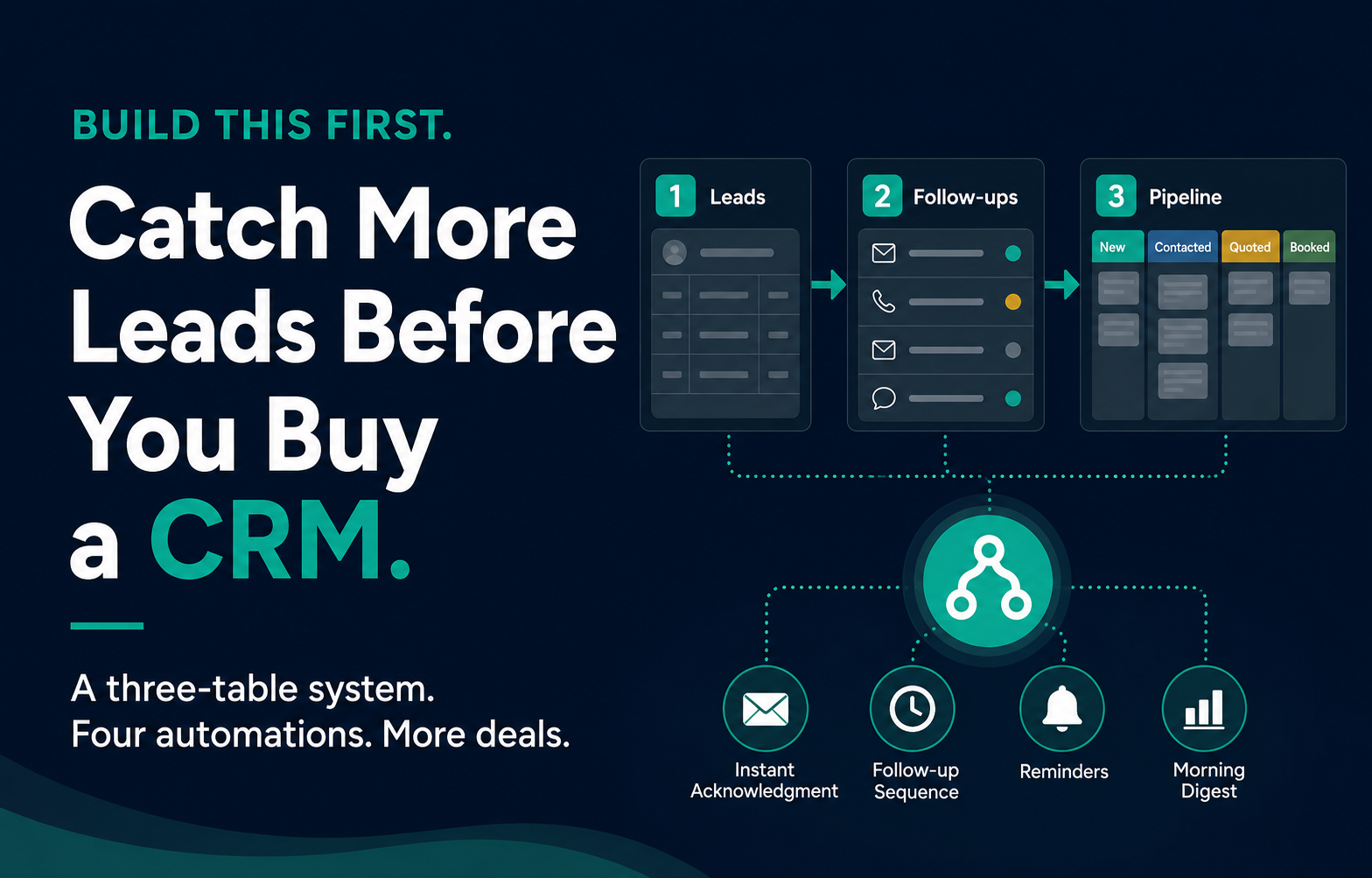
There’s a simpler move. Before you buy anything, build the three-table system that handles the part where leads actually get lost: intake, assignment, and follow-up. You can build it in Airtable for free, wire it up with Make or Zapier, and have the whole thing running in an afternoon. If you outgrow it in a year, great. Migrate to a CRM then, with a clear picture of what your process actually needs.
Why CRMs fail small businesses
It’s not because the software is bad. It’s because CRMs are designed for a sales team, and most small businesses don’t have one.
A CRM assumes you have a defined sales process, someone whose job is to update records, and enough deal volume that pipeline management matters. A five-person service company has a form on their website, an owner who checks email between jobs, and maybe a spreadsheet somewhere. The gap between what the CRM expects and what the business actually does is where adoption dies.
I’ve watched this play out repeatedly. The owner buys the CRM after a bad month of lost leads. They spend a weekend setting it up. For two weeks they log every lead. By week three, two leads come in during a busy day and go straight to the inbox instead of the CRM. By month two, the CRM is a graveyard of contacts from January.
The tool didn’t fail. The process underneath the tool didn’t exist.
What to build instead
The intake system that actually catches leads has three components. I’ll use Airtable here because it’s free for a small team and flexible enough to grow, but any database tool works. Notion, Google Sheets with some discipline, whatever you’ll actually use.
Table one: Leads
Every lead goes here. Every one.
Fields:
- Name
- Contact info (phone, email)
- Source (website form, phone call, referral, Google ad)
- Service interest (what they asked about)
- Date received
- Status (New, Contacted, Quoted, Booked, Lost)
- Assigned to
This table is the single source of truth. If a lead isn’t here, it doesn’t exist. The status field is what turns a list into a system.
Table two: Follow-ups
Linked to the Leads table. Every follow-up attempt gets a row.
Fields:
- Lead (linked record to Table 1)
- Date sent
- Type (auto-reply, manual call, follow-up email, final check-in)
- Response (yes, no, pending)
- Notes
This is the part everyone skips when they manage leads by memory. You think you followed up. You didn’t. Or you did, but you forgot who you called yesterday versus last week. The follow-up table makes it visible and measurable.
Table three: Pipeline
More of a view than a separate table, really. This is your Leads table filtered and grouped by status, showing you exactly what needs attention right now.
- New leads that haven’t been contacted
- Contacted leads waiting on a response
- Quoted leads who haven’t said yes or no
- How many days each one has been sitting in that stage
Build this as a Kanban view in Airtable. Drag a card from “New” to “Contacted” when you call them. The pipeline view takes ten seconds to scan in the morning and tells you exactly where to spend your time.
The automations that connect it
The tables are the skeleton. The automations are what keep the whole thing from depending on someone’s memory.
You need three, maybe four. All of them are simple scenarios in Make (or Zaps in Zapier).
Automation 1: Form to table. When someone submits your website contact form, a new row appears in your Leads table automatically. Status set to New. Assigned to whoever handles leads. This replaces the “email inbox as lead system” pattern. The lead exists in your system the moment they submit, whether or not anyone checks their email.
Automation 2: Instant acknowledgment. Same trigger. Within sixty seconds of the form submission, the lead gets an email: “Got your message. We’ll be in touch within the hour.” This buys you time. The lead knows they were heard. You don’t have to drop everything, but they aren’t sitting in silence wondering if the form even worked.
Automation 3: Follow-up sequence. If a lead’s status is still “Contacted” after 48 hours, send a short follow-up. If still no response after five days, send one more. Two additional touches, both brief. This runs in the background and recovers leads that would otherwise vanish quietly.
Automation 4 (optional): Morning digest. Every day at 8am, send the lead owner a summary. X new leads, Y awaiting response, Z quotes pending. One glance. No logging in required.
The handoff points
Three places where automation ends and a human takes over. Get these wrong and you’ve built a robot that annoys people.
After the auto-reply. The acknowledgment is automated. The actual response is not. A human calls or emails the lead with a real answer. The automation bought time. The human provides value.
The quote. The system can remind you a lead needs a quote. It should not write the quote. Pricing, scope, and the judgment calls about what a job involves are yours.
The close. When a lead says yes, someone updates the status to Booked. This is the one manual step the system requires, and it’s the step that keeps everything downstream honest. Automate data entry. Don’t automate decisions.
The math
Say you’re a service business getting 20 leads a month. Average job value is $2,000. Current close rate is 25%, so you’re booking five jobs for $10,000 a month from inbound leads.
The three biggest leaks in a typical small business (slow first response, no follow-up, leads buried in email) cost roughly 3 to 5 deals a month. That’s conservative based on what I’ve seen across service businesses.
Fix those leaks and you’re converting 8 leads instead of 5. That’s $16,000 instead of $10,000. Six thousand dollars a month you were already paying to generate but letting walk out the door.
Airtable: free for a small team. Make: $9 to $29 a month depending on how many scenarios you run. Total cost of the system: under $30 a month and an afternoon to build.
Compare that to the CRM that costs $300 a month, takes two weeks to configure, and gets abandoned by March.
When you actually need a CRM
I’m not anti-CRM. CRMs are good tools for the right situation.
You need one when you have a real sales team, more than two people handling leads. When your deal cycle is long enough that pipeline forecasting matters. When you need reporting beyond “how many leads came in and what happened to them.” When you’ve outgrown the three-table system and you know exactly what you need the CRM to do.
That last part is the point. The three-table system isn’t a permanent replacement for a CRM. It’s the thing you run first so that when you do buy one, you know what your process looks like, what fields you actually use, and what automations you actually need. You’ll set up the CRM in a day instead of a month, because the hard part is already done.
The real question
The question isn’t whether you need a CRM. It’s whether you have a lead intake system that works right now, today, with the team and the habits you actually have.
If the answer is no, don’t buy software. Build the three-table system, wire up the four automations, and run it for 90 days. Count the leads. Measure the response time. See what converts.
Then decide if you need more. Usually, the answer is not yet.
Have a project in mind? We'd love to hear about it.
Start a conversationRelated posts
Private Equity Bought Your Competitor and Gave Them a Tech Stack
PE-backed roll-ups are winning home services on response speed and booking systems. Most of that stack is rentable. Here's how to keep up.
Your Past Customers Are Your Cheapest Source of New Revenue
The customers who already paid you and went quiet are the easiest to bring back. Here's what reactivation actually looks like for service businesses.
The Missed-Call Text System Every Home-Service Business Should Have
When a contractor can't answer the phone, the customer calls someone else. An automated missed-call text costs almost nothing and saves the lead.